HTTP Submission for Minidump
You may have a pre-existing crash reporting facility or generate dump files using MiniDumpWriteDump on Windows; this guide shows you how to submit these over HTTP or HTTPS. If you use a supported crash reporting library, use their preferred submission mechanisms.
What You'll Need
- A Backtrace account (log in or sign up for a free trial license).
- Your subdomain name (used to connect to your Backtrace instance). For example,
https://example-subdomain.sp.backtrace.io. - A Backtrace project and a submission token.
Submit a Dump File
For this example, let us assume that our submission token is abcdef0123456789. An HTTP POST is used to submit a dump file. The example below shows a curl invocation.
For large files, include the header flag -H "Expect:" to override some default curl behavior which can cause issues when uploading to Backtrace.
curl -v --data-binary @example_minidump.dmp -H "Expect:" "https://submit.backtrace.io/<universeName>/<errorSubmissionToken>/minidump"
You can do the same through HTTP multipart:
curl -v -F "upload_file_minidump=@example_minidump.dmp" -H "Expect:" "https://submit.backtrace.io/<universeName>/<errorSubmissionToken>/minidump"
Attaching Attributes
You can pass user-defined attributes as:
- query string parameter
- multipart form data parameter
You can mix them and use some in the query string and some in the multipart form data.
Query String Parameter
For example, let's say that we wanted to submit a minidump and set the version attribute associated with it to 1.0:
curl -v -F "upload_file_minidump=@example_minidump.dmp" -H "Expect:" "https://submit.backtrace.io/<universeName>/<errorSubmissionToken>/minidump&version=1.0"
Multipart Form Data Parameter
For example, let's say you wanted to submit a minidump and set the version attribute associated with it to 1.0.
curl -v -F "version=1.0" -F "upload_file_minidump=@example_minidump.dmp" -H "Expect:" "https://submit.backtrace.io/<universeName>/<errorSubmissionToken>/minidump"
For more information on attributes, see Indexing Attributes.
Attaching Files
Multipart POST
A submission where the test.json attachment is included with the initial crash submission. You will need to modify the following to submit to a project in your account successfully:
<Path_to_your_file>: Location of file containing crash data to send<Path_to_your_attachment>: Location of the file to be attached to the crash<universe>: First part of the URL used to access your Backtrace account<error-token>: An error token for the project you want to submit crash data to
curl -v -F "upload_file=@<Path_to_your_file>/example_minidump.dmp" -H "Expect:" -F "attachment_test.json=@<Path_to_your_file>/test.json; type=application/json" "<backtrace submission url>"
Attach a File to an Existing Crash Report
This method requires the _rxid value to be assigned to a submitted crash report. This value will be returned after submitting a properly formatted request. The first curl command is the submission of the crash report. The second is the attachment of a file to the first.
curl -d <Path_to_your_file>/example_minidump.dmp -H "Expect:" "<backtrace submission url>"
<Path_to_your_file>: Location of file containing crash data to send<universe>: First part of the URL used to access your Backtrace account<error-token>: An error token for the project you want to submit crash data to
A properly formatted crash report submission should return a response like this:
{"response":"ok","_rxid":"56000000-8be7-5806-0000-000000000000"}
To attach a file to this object, copy the _rxid returned.
curl -v --data-binary "upload_file=@<your_file_path>/test.json" -H "Expect:" -H "Content-Type:application/json" "<backtrace submission url>?object=<\_rxid>&attachment_name=<Path_to_your_attachment>"
&object=<_rxid>: value returned from first http submission&attachment_name=<Path_to_your_attachment>: Location of the file to be attached to the crash
A suitably formatted upload submission should return a response like this:
{"response":"ok","_rxid":"ce000000-0000-0000-0000-000000000000","attachment_name": "test.json","attachment_id": "28","object":"ce"}
The response should tell you that the file was attached to the specified object in your Backtrace project. You will still get the 200/ok response, but the _rxid will look slightly different. As no crash was submitted, it will not send a new unique id. This time it sends the id attribute/Error identifier in the debug view used to identify the specific crash report.
Listener Layer
It is also possible to submit directly to the listener on your instance. The first step is ensuring a listener exists for submitting crash data. Look for listeners with the http/writerlabel. You can find Listener settings under the Configuration Organization.
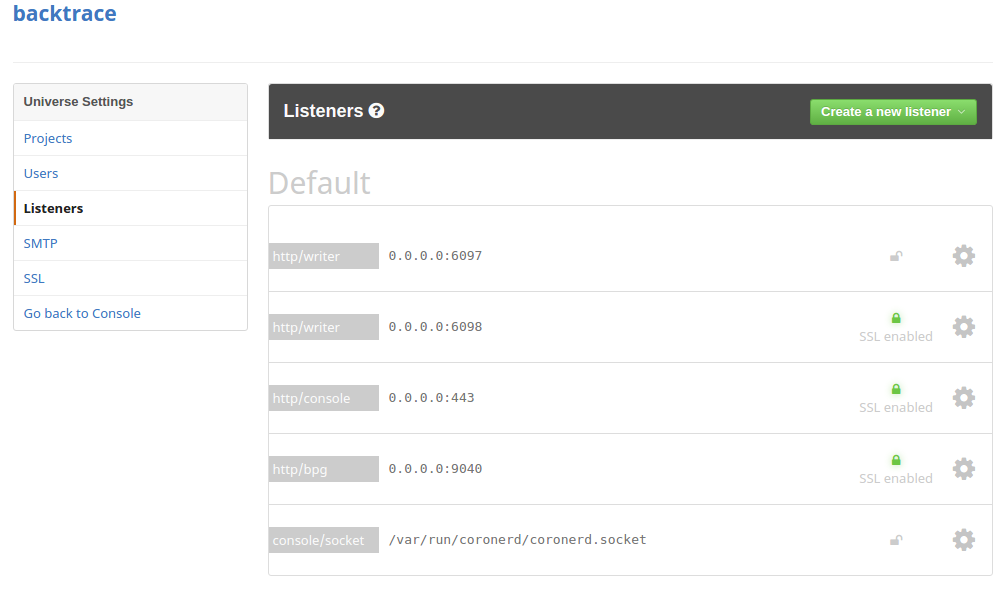
In the above example, if the server is hosted at testing.company.com, then we can submit dump files to either http://testing.company.com:6097/post?format=minidump&token=<abcdef0123456789> or https://testing.company.com:6098/post?format=minidump&token=<abcdef0123456789>. They are the first two entries in the above screenshot, with the http/writer labels.