Bitbucket Pipelines
Set up Bitbucket Pipelines to upload your build artifacts (IPA or APK) directly to Sauce Labs Mobile App Distribution for distribution.
Setting Up
-
Open your Bitbucket repository, and select Settings > Pipelines > Environment Variables
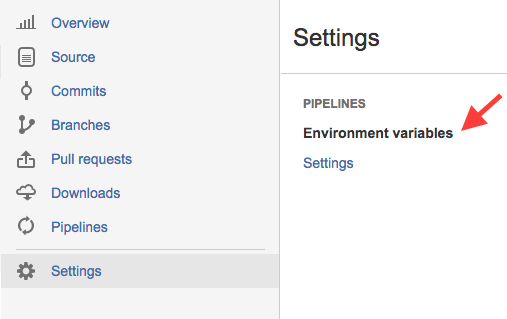
-
Fill in variable and value:
- Variable: TESTFAIRY_API_KEY
- Value: Your API application key. See https://app.testfairy.com/settings for details.
- Secured: Y
-
Click Add.
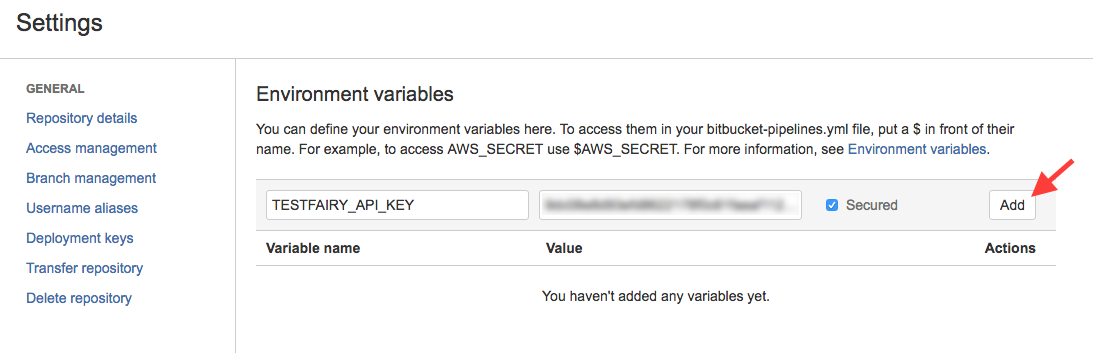
-
Edit your
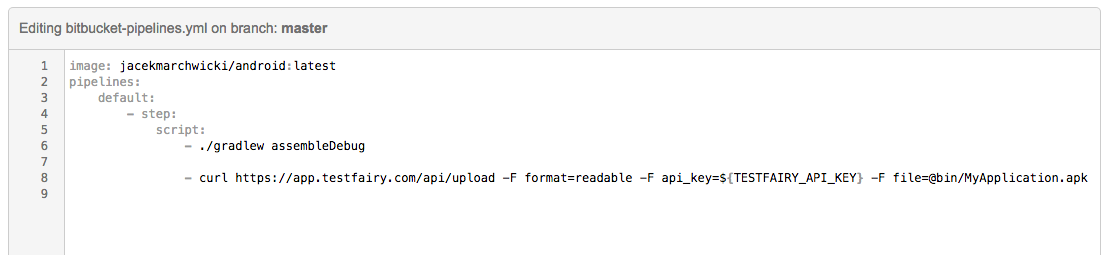
bitbucket-pipelines.ymland add this command to yourscriptsection:curl https://app.testfairy.com/api/upload -F api_key=${TESTFAIRY_API_KEY} -F file=@MyApplicationFile.apk -F format=readable
caution
Do not forget to replace MyApplicationFile.apk with the path to your APK or IPA files.
Additional optional parameters such as testers-groups, notify, and comment can be added to this line. Refer to the Upload API reference guide for more information and examples.
Here is a screenshot of a sample bitbucket-pipelines.yml file: