Logging
Beta release
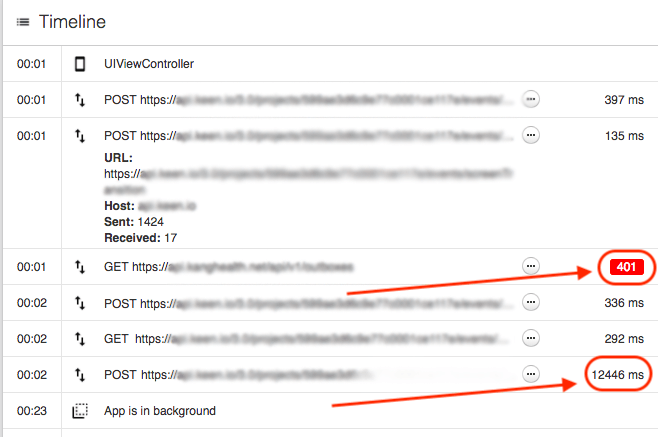
The Sauce Mobile Beta SDK can log your app's network requests and handled exceptions to the session timeline, giving you an effortless way to monitor your app's network access and non-fatal errors. For the iOS-specific network setup, see Log Network.
- Android
- iOS Objective C
- iOS Swift
- React Native
TestFairy.addNetworkEvent(URI uri, String method, int code, long startTimeMillis, long endTimeMillis, long requestSize, long responseSize, String errorMessage);
OkHttp or Retrofit all you need to do is add CustomHttpInterceptor to your client:// Be sure to import the SDK
import com.testfairy.TestFairy;
public class CustomHttpInterceptor implements Interceptor {
@Override
public Response intercept(@NonNull Chain chain) throws IOException {
Request request = chain.request();
long startTimeMillis = System.currentTimeMillis();
Long requestSize = request.body() != null ? request.body().contentLength() : 0;
Response response;
try {
response = chain.proceed(request);
} catch (IOException e) {
long endTimeMillis = System.currentTimeMillis();
TestFairy.addNetworkEvent(request.url().uri(), request.method(), -1, startTimeMillis, endTimeMillis, requestSize, -1, e.getMessage());
throw e;
}
long endTimeMillis = System.currentTimeMillis();
long responseSize = response.body() != null ? response.body().contentLength() : 0;
TestFairy.addNetworkEvent(request.url().uri(), request.method(), response.code(), startTimeMillis, endTimeMillis, requestSize, responseSize, null);
return response;
}
}
OkHttpClient client = new OkHttpClient.Builder()
.addInterceptor(new CustomHttpInterceptor())
.build();
[TestFairy addNetwork:(NSURLSessionTask *)task error:(NSError *)error]
NSURLConnection, all you need to do is add callback to your request at the beginning and end of the request.note
If you have AFNetworking added to your project, network requests are automatically captured when enabled in your build settings.
// Be sure to import the SDK
#import "TestFairy.h"

__block NSURLSessionTask *task = [[NSURLSession sharedSession] dataTaskWithURL:url completionHandler:^(NSData *data, NSURLResponse *response, NSError *error) {
    // ...
    [TestFairy addNetwork:task error:error];
}];
[TestFairy addNetwork:task error:nil];
[task resume];
TestFairy.addNetwork(<URLSessionTask>, error:<NSError>)
URLConnection, all you need to do is add callback to your request at the beginning and end of the request:var task: URLSessionTask? = nil
task = URLSession.shared.dataTask(with: URL(string:"")!) { (data, response, error) in
TestFairy.addNetwork(task, error: error)
}
TestFairy.addNetwork(task, error: nil)
task?.resume()
Alamofire:import Alamofire
NotificationCenter.default.addObserver(forName: Request.didResume, object: nil, queue: nil) { (notification) in
let info = notification.userInfo
let request = info?["org.alamofire.notification.key.request"] as! Request
request.tasks.forEach { TestFairy.addNetwork($0, error: nil) }
}
NotificationCenter.default.addObserver(forName: Request.didComplete, object: nil, queue: nil) { (notification) in
let info = notification.userInfo
let request = info?["org.alamofire.notification.key.request"] as! Request
request.tasks.forEach { TestFairy.addNetwork($0, error: nil) }
}
ExampleSauce Labs Mobile App Distribution supports network logging for
Fetch API. Call the following method to start capturing network calls.// Capture network logs
TestFairy.enableNetworkLogging(window);
// Capture network logs, including http headers and content
TestFairy.enableNetworkLogging(window, { includeHeaders: true, includeBodies: true });
// Disable network logging
TestFairy.disableNetworkLogging(window);
Exception Logging
Sauce Labs Mobile App Distribution allows developers to log up to five exceptions or errors for a session.
note
It does not mark the session as crashed. It only logs the exception or error to the session.
- Android
- iOS Objective C
- iOS Swift
- React Native
TestFairy.logThrowable(<throwable exception>);
// Be sure to import the SDK
import com.testfairy.TestFairy;

TestFairy.logThrowable(new Throwable("Some Message"));
[TestFairy logError:<NSError>];
[TestFairy logError:<NSError> stacktrace:<NSArray<NSString>>];
// Be sure to import the SDK
#import "TestFairy.h"

[TestFairy logError:[NSError errorWithDomain:@"com.your.domain" code:-1 userInfo:@{NSLocalizedDescriptionKey: @"Some Message"}]];
TestFairy.logError(<NSError>)
TestFairy.logError(<NSError>, stacktrace:<[String]>)
let error = NSError(domain: "com.your.domain", code: -1, userInfo: [NSLocalizedDescriptionKey : "Some Message"])
TestFairy.logError(error)
TestFairy.logException(<Error>);
// Be sure to import the SDK
import TestFairy from '@saucelabs/mobile-beta-react-native';

var error = new Error("Some Message");
TestFairy.logException(error);
Global Handler with a custom method, automatically sending the exception to Sauce Labs Mobile App Distribution sessions. One suggestion we have is to add a method that looks like this:const ErrorUtils = global.ErrorUtils;
var originalGlobalHandler = ErrorUtils.getGlobalHandler();
ErrorUtils.setGlobalHandler((error, isFatal) => {
TestFairy.logException(error);
originalGlobalHandler.handleException(error, isFatal);
});