Gitlab
To automatically deply your Android or iOS Apps to Sauce Labs Mobile App Distribution by using GitLab, follow the steps below:
-
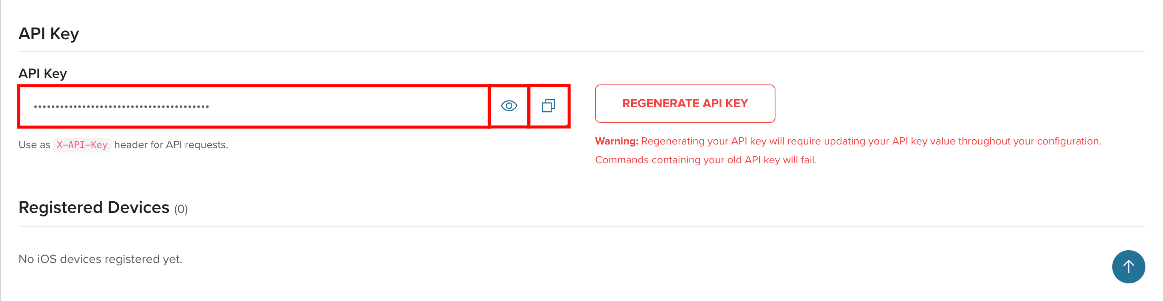
In Sauce Labs Mobile App Distribution, click API Credentials in the top navigation bar, or click the Profile icon in the top-right corner and select My Profile. Your key is in the API Key section.
-
Copy your API key and go to your application's project Settings > CI/CD > Variables in GitLab.
-
Add a variable called
TESTFAIRY_API_KEYto the list with the value of your API key.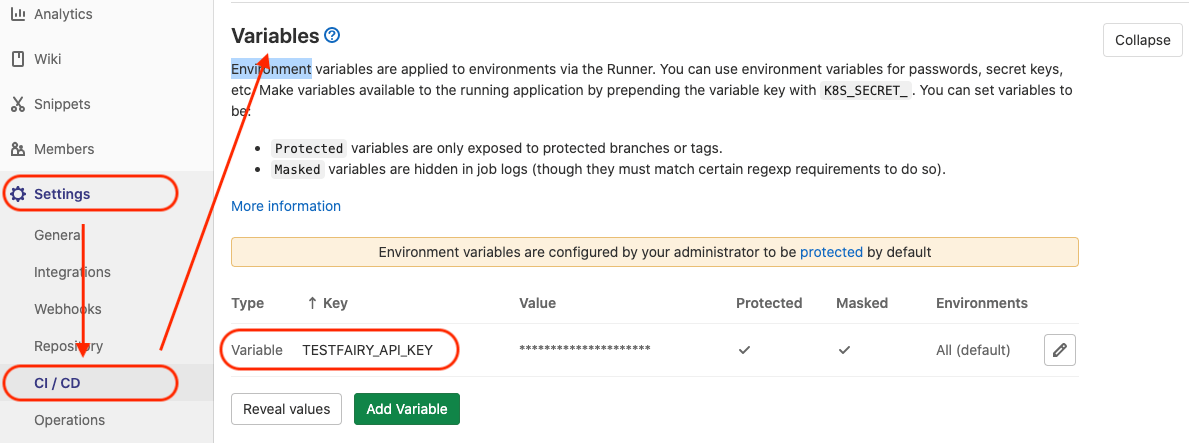
-
To deploy, add a job to your
.gitlab-ci.ymlconfiguration using fastlane orcurl(example below).stages:- deploydeploy:stage: deployonly:- masterscript:- |curl \-A "GitLab CI" \-F api_key="${TESTFAIRY_API_KEY}" \-F comment="GitLab Pipeline build ${CI_COMMIT_SHA}" \-F file=@android.apk \https://app.testfairy.com/api/upload/
-
note
Replace the -F file=@android.apk argument with a path to your APK or IPA.
For a complete list of available options, visit the Upload API reference guide.